How Web Tracking Works and Why You Never See It
A web page isn’t one thing from one place. The article comes from the news site, but the fonts may come from a font service, the ads from an ad network, the share button from a social network and the visitor counter from an analytics company. Your browser fetches each piece from wherever it lives, and every one of those places learns that someone at your internet address just opened that article.
That’s the whole trick behind most web tracking. Nobody has to break in. The page asks your browser to fetch something from another company, and the request itself is the message.
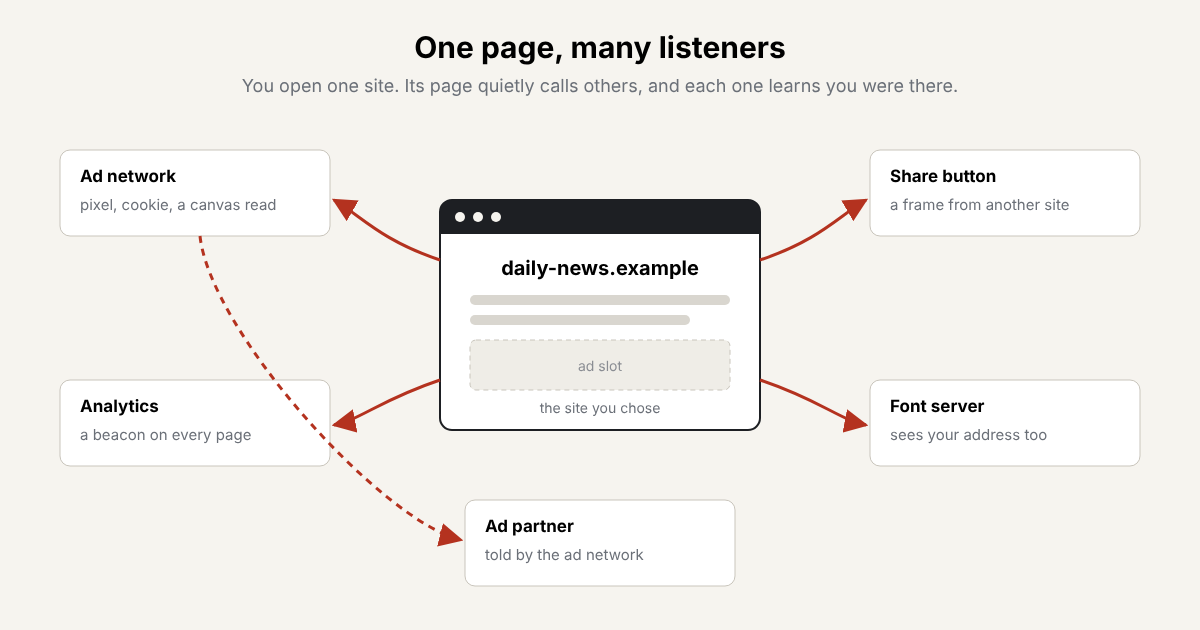
Each arrow is a request your browser makes on the page’s behalf.
The Pieces
Pixels. A tracking pixel is an image one dot wide that nobody is meant to see. Fetching it is the point: the request carries the page you’re on and any cookie the tracker set before.
Scripts. A tracker’s script runs inside the page with the same powers as the page’s own code. It can read what you click, send data back with fetch or a beacon, and load more trackers in turn. That’s how an ad network can quietly pass your visit on to its partners, which the page itself never mentioned.
Cookies. A cookie is a small note a site leaves in your browser and gets back with each request. A note from the ad network, left while you read one site, comes back when another site uses the same network. Put enough of those together and the network has a list of where you’ve been.
Storage. Pages can also keep notes in local storage and IndexedDB, which work much like cookies but never travel on their own. A script has to read them and send them.
Fingerprints. When cookies are blocked or cleared, a tracker can still try to recognise your device by how it behaves. Drawing text on a hidden canvas and reading the pixels back gives a slightly different answer on different graphics hardware and fonts. Asking WebGL which graphics card you have, or measuring how your device renders a short sound, adds more detail. None of it needs your permission.
Why You Don’t See It
Browsers are built to load pages, not to explain them. All of this happens in the first second or two, in parallel, out of view. The developer tools in a browser do show every request, but as a scrolling table of addresses meant for programmers. The cookie banner, where there is one, tells you about categories of purpose, not which companies were called before you clicked anything.
Seeing It
Watchkeeper turns that table into a short list. Each request is filed under its site, so forty addresses on one ad network become one line. Cookies come from the engine’s own store, storage writes are credited to the frame that made them, and each fingerprinting read names the site whose script did it. The quick start shows how to read the panel.
Seeing the list doesn’t stop anything. It does turn “this site may share data with partners” into the names of the partners.